
JuicyChat AI Review 2026
Is it worth it for flirty chats and slow-burn romance?
Quick verdict
A good pick for slow-burn roleplay.
Start with a sharp-tongued rival or an old flame and see where the banter goes. You can pick a character, write your own, or turn a scene into a picture or clip.
- Best for
- Flirty, story-led chat
- Platform
- Desktop and mobile web
- Free access
- Limited starter chat
- Web Premium
- $12.99/month


JuicyChat pros and cons
JuicyChat is most tempting when you already know the kind of chemistry you want. You can find a promising setup in a few clicks. Figuring out what a long chat or several clips will cost takes a little more attention.
What makes it fun
- Tags help you find a sweet reunion, a sharp-tongued rival or a fake date with potential.
- You can write the backstory and opening line yourself.
- A reusable figure gives your character a look you can carry into supported images and clips.
- You can start in a desktop or mobile browser.
What to weigh
- Free chat gives you a taste. Check how many messages are available to you.
- Media can spend credits on top of your plan price.
- A clever opener tells you little about whether the character will remember your last scene.
- The web refund window is short. Using chat or media after purchase can make you ineligible.
Plans & credits
How much does JuicyChat AI cost?
Try the free tier to see how the banter feels. Web plans start at $12.99 month to month. All prices below are in USD.
Annual rates show the monthly equivalent of a single upfront payment. Check the full annual charge at checkout.
| Plan | Month to month | Annual monthly equivalent | JuicyCoins per month |
|---|---|---|---|
| Free | $0 | No annual plan | No membership grant |
| Premium | $12.99/mo | $7.83/mo | 6,000 |
| Deluxe | $43.99/mo | $26.67/mo | 30,000 |
| Diamond | $88.99/mo | $65.75/mo | 70,000 |
| Eternal | $188.99/mo | $132.42/mo | 160,000 |
What changes when you upgrade?
Premium gives you 50% off JuicyLLM messages. Deluxe, Diamond and Eternal include unlimited JuicyLLM messages. Diamond and Eternal also give you access to Max models. Check the price on the model, voice or media action you want to use.
Monthly coin grants and billing
Your included JuicyCoins refresh monthly, even on an annual plan. Annual plans can add a one-time bonus. Cancel a monthly web subscription in Profile → Manage Subscription. Need more credits? See what the Store sells.
Request a web refund within 24 hours. Using chat, images, voice or JuicyCoins can make your purchase ineligible. Check refund eligibility.
What can you buy in the JuicyChat Store?
Open Store in the sidebar to see the packs and bundles available to your account. Before topping up for another scene, check which currency it uses.
What can you do on JuicyChat AI?
JuicyChat AI is a browser-based roleplay site for adults, run by Cognify AI LTD. You can flirt with a character someone else wrote, create your own, or take a scene from text to pictures, voice or video where those tools are available.
Find a character worth flirting with
Try Slow Burn, Friends to Lovers or Fake Dating in the character directory. Read the first message before you pick. A rival who already has a reason to tease you gives you more to work with than a profile that opens with “Hey.”
Write the character you want to meet
Give her a backstory, a sharp comeback and an opening line that gives you something to answer. See how to create your own AI girlfriend.
Put more than one character in the scene
For a group scene, try the Multiple tag. Give an old flame a reason to interrupt your date, then see who asks you to stay. You can also browse the Scene Card and Persona Card tags.
See which details make it to the next date
How much a character remembers can vary by chat model. Slip a detail into your first scene and see whether they bring it up later. You can also browse shared scenes in Memories.
Choose their look and make a clip
Once you have a scene you like, use Generate to make a still or a clip. You can start with your own description, a saved figure or an image, depending on the mode.
Give that line a voice
You can customize a character’s voice when the option is available. If that teasing line deserves to be heard, check which voice options your character and plan support before you subscribe.
How to create an AI girlfriend on JuicyChat
Start in Create → Create Character. Give her a reason to flirt with you. A confident rival who keeps saving you a seat already has a habit you can tease her about.
Give her a name and a personality
Pick a name for your fictional adult character and add a profile image and a short intro. In her backstory, give her a quirk that shows up in chat. Maybe she gives compliments so dry you have to listen twice.
Write where you meet and what she says first
Use the scenario field to set the scene. Is she the singer you keep trading digs with at the jazz bar, or the old flame who kept your number? Write her greeting and add a sample exchange to show how she teases or flirts.
Attach a figure for her look
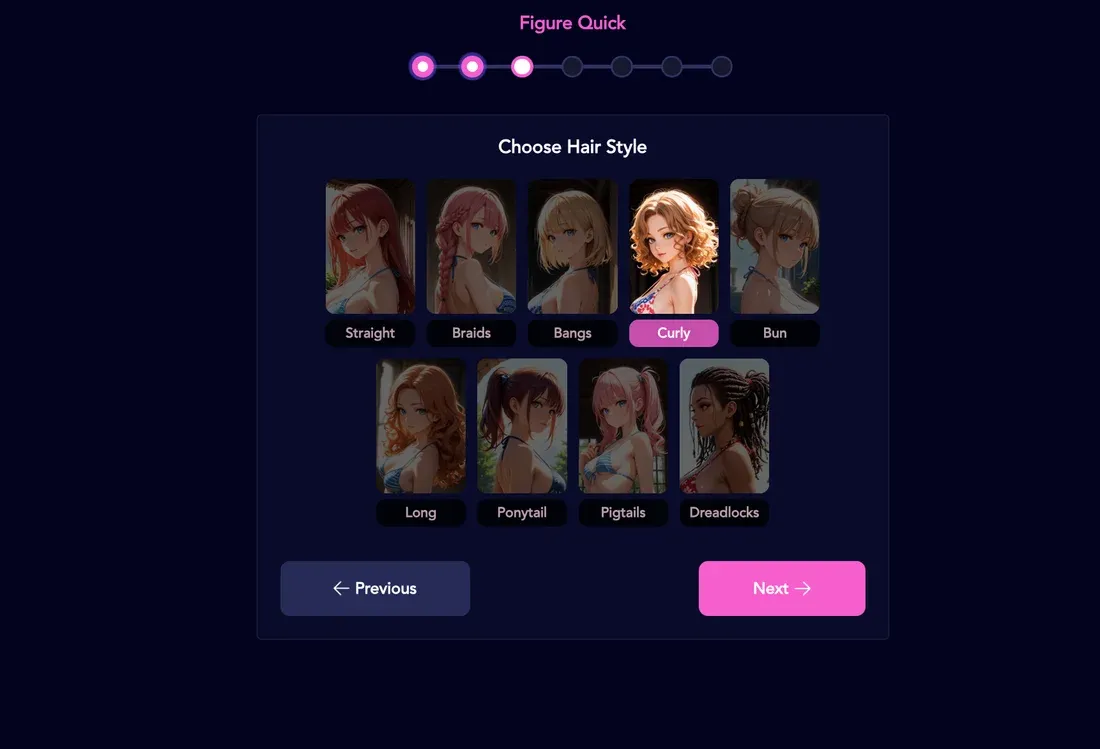
Use Figure Quick to make choices from presets or Figure Custom to describe her face, hair and outfit. Attach the figure in her character settings to reuse her look in supported image tools.
Choose who can chat with her
Pick Private to keep her for yourself, Unlisted to share by link, or Public to submit her for discovery. Save, start a chat and see whether her replies sound the way you pictured them.
How to generate images and videos on JuicyChat
Open Generate to make a still or turn a character or image into a clip. Start with a still if you’re working out how the scene should look. Once the face, outfit and framing feel right, you have a starting image for the video.
Generate an image
- Text to Image
- Write the picture from scratch. Describe the character, what they’re doing and where they are. If you see a negative prompt field, you can use it to leave out details like text or extra people.
- Figure to Image
- Pick a saved figure to reuse the character’s look. Give them a new action and setting, such as taking the last seat at the bar. Use the image count and aspect ratio controls when available.
Generate a video
- Figure to Video
- Pick the saved figure you want to animate, then choose an action. Add a scene or outfit if those options are available for your setup.
- Image to Video
- Choose a still that already has the look you want. Use an available action preset or add a motion prompt where supported. Start with one movement, like a quick glance up from the piano.
Pictures during a chat
For a picture that goes with the conversation, attach a figure in your character settings and use in-chat image generation where available. The figure gives your character’s look a starting point you can reuse in later scenes.
Check the cost before you generate
Review the JuicyCoin total before you confirm. Check it again if you change the model, add more outputs or extend a clip. Batch images, advanced settings and some video controls can depend on your plan.
Six reader scenarios
Fictional examples of what people might look for in JuicyChat, from building a character to keeping media costs predictable.
Story discovery
The Character Stories Really Pulled Me In
I love the idea of escaping into a story where I get to shape what happens next. JuicyChat's character selection and roleplay options make that sound genuinely exciting. On a rough evening, I'd rather explore a funny, unpredictable scene than stare at another endless feed.
Character creation
Creating My Own Character Is the Fun Part
What appeals to me most is making a character with a look and personality I actually care about. The ability to generate matching images adds something special. I'd still want to see whether the personality stays consistent in longer conversations, but the creative freedom is a big plus.
Everyday conversation
Fun for Roleplay, Less Certain About Everyday Chats
I can see myself getting into a fantasy roleplay here, especially with different characters to choose from. But I don't always want to be acting out a story. Some nights I just want an ordinary, thoughtful conversation, and I'm not sure JuicyChat would be my first choice for that.
Spending control
I Like the Options, Not the Spending Guesswork
The character builder and image tools are tempting, but I'm the kind of person who checks the cost before clicking anything extra. JuicyCoins make me hesitate a bit. It might be worth it for someone who makes lots of content; I'd probably stick mostly to chat.
Story continuity
Nothing Breaks the Mood Like a Forgotten Detail
For me, the whole point of a long roleplay is that the little details matter. I'd be frustrated if a character suddenly forgot a relationship or plot twist I spent ages building. Even with plenty of characters available, I'd need dependable memory before getting invested.
Media costs
The Extras Could Make Relaxing Feel Expensive
I hate the feeling that every fun extra might cost more coins. Pictures and videos sound exciting, but the last thing I want during a relaxing chat is to calculate whether I can afford the next interaction. I'd prefer pricing that feels simpler and more predictable.
JuicyChat AI alternatives
If you like choosing the face that goes with the banter, look at Candy AI. Nectar AI is worth a look for scenes with a bigger cast. OurDream is another option if you want to write a companion and give them a look of their own.



| Service | Best fit | Free access | Trade-off |
|---|---|---|---|
| JuicyChat AI | Community character roleplay | Limited starter chat | Check both plan benefits and JuicyCoin charges. |
| Candy AI | Visual companions | Limited starter access | Media and voice use tokens even when regular paid chat is available. |
| Nectar AI | Group stories and media prompts | Starter chat and limited image generation | Plan and model choice affect generation limits and credit charges. |
| OurDream | Custom companions and generated media | Limited basic access | Standard is $19.99 on monthly billing. Check Dreamcoin charges for media. |
Privacy & safety
What does JuicyChat collect?
JuicyChat may collect content you share, images, device and network information, and transaction data. It may use some of that information for analytics and advertising.
Keep identifying details out of chat
Give your roleplay character a made-up name and keep your real address, logins and personal photos out of the chat. Use fictional details for other people too.
Check what you share publicly
Check who can see a character or image before you publish it. JuicyChat’s privacy policy explains how to close your account or make a data request.
Frequently asked questions
Is JuicyChat AI free?
Yes, it offers limited free access to basic chat. Try a greeting that catches your eye, then check how many replies you have left and which models you can use.
How much does JuicyChat AI cost?
The web prices are Premium $12.99, Deluxe $43.99, Diamond $88.99, Eternal $188.99 per month in USD. Annual Premium works out to $7.83 a month with one upfront payment. Check your full total at checkout.
What can I buy in the JuicyChat Store?
The Store sells JuicyCoins for eligible chats and media, and JuicyGems for some premium content, including creator-made image sets. Deluxe, Diamond and Eternal members can see bundles that include both. Check the price and currency before you buy.
How do I create an AI girlfriend on JuicyChat?
Open Create, then Create Character. Give your girlfriend a name, personality and opening line. You can attach a figure for supported images. Pick who can see her, then save and start a chat.
Can I keep my custom character private?
Yes. Choose Private in the creator if you’re keeping the character for yourself. Unlisted lets you share it by link. Public characters can appear in discovery and are subject to review.
Does JuicyChat remember past conversations?
Recall can vary by model and conversation. If your story depends on a promise, a favorite drink or an inside joke, see whether the character picks it up again later in a short scene.
Does JuicyChat have character voices?
Yes, you can customize a character’s voice where the option is available. Check which voice options your character and plan support and whether they use credits.
Can I make images and videos on JuicyChat?
Yes. In Generate, make a still from text or a saved figure. Use Image to Video to animate a still, or Figure to Video to start from a saved figure. Check your JuicyCoin total before you generate.
Can I use JuicyChat on a phone?
Yes. Open JuicyChat in your mobile browser. If you prefer a native app, check availability in your regional app store.
Is JuicyChat AI safe to use?
JuicyChat is for adults and may collect what you share in chat. Give your roleplay character fictional details and keep sensitive information out of the conversation.
How do I cancel a JuicyChat subscription?
Cancel a monthly web subscription in Profile → Manage Subscription. For an iOS purchase, use Apple Subscriptions and check its cancellation deadline. Annual web membership is a one-time payment.
Can I get a refund from JuicyChat?
Request a web refund within 24 hours of payment. Using chat, images, voice or JuicyCoins makes the purchase ineligible. For an app-store purchase, check the refund process for the store that charged you.
Final verdict
Is JuicyChat AI worth it?
Try JuicyChat if you like a little build-up. Give your rival a chance to tease you, then see if they’re still looking for excuses to sit next to you a few messages later. Start with a free scene and pay only if the character keeps up and you’re comfortable with the cost.
Review the plans